
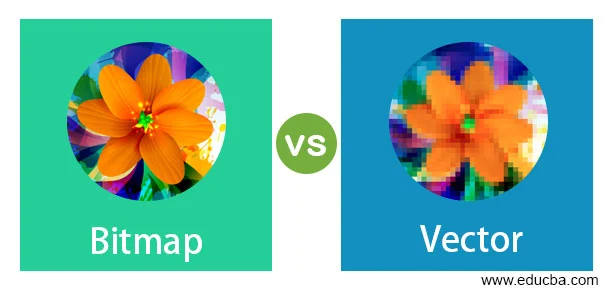
A bitmap image is one of the most common types of digital pictures you see every day on your phone, computer, and camera. It is made from tiny dots called pixels, and each pixel carries a color. When all these pixels come together in a grid, they form a complete picture that looks smooth from far away. In simple words, a bitmap image is like a digital mosaic made of many small colored squares that build one full image.
A bitmap image is used everywhere in modern digital life. You see it in photos, social media posts, website pictures, and even video games. Most images you capture with a camera are bitmap image files. These images can show very detailed and realistic scenes, like faces, nature, or objects. Because of this, bitmap image formats are extremely popular in photography and digital art.
Understanding bitmap image is important because it helps you know how digital pictures work. It also helps you choose the right image type for editing, designing, or sharing. In this article, you will learn everything about bitmap image in very easy language, step by step, so even beginners and kids can understand it clearly.
What is a Bitmap Image
A bitmap image is a type of digital image made of many tiny dots called pixels. Each pixel has its own color value, and when millions of pixels come together, they create a complete picture. You can think of a bitmap image like a big chessboard where every square has a different color, and together they form a beautiful picture.
A bitmap image is also called a raster image in many design tools. The word “bitmap” means a map of bits, and those bits control the color of every pixel. The more pixels a bitmap image has, the clearer and sharper the image becomes. This is why high-resolution photos look very detailed, while low-resolution images look blurry.
Most photos taken from smartphones and digital cameras are bitmap image files. They store a lot of color and light information, which makes them look real and natural. Because of this, bitmap image formats are widely used in photography, social media, and online content.
How Bitmap Image Works
A bitmap image works by storing information for each pixel individually. Every pixel has a position and a color, and together they form a grid. When your device shows the image, it reads all the pixel data and displays it on the screen. This process happens very fast, so you only see the final picture.
When you zoom into a bitmap image, you start seeing small square blocks. These blocks are pixels. This happens because the image is made of fixed points. Unlike shapes or lines, pixels do not stretch smoothly. That is why a bitmap image can become blurry when enlarged too much.
The quality of a bitmap image depends on its resolution. Resolution means the number of pixels in the image. Higher resolution means more detail and better clarity. Lower resolution means fewer pixels, which leads to a rough or pixelated look. So, bitmap image quality is always connected to pixel count.
Features of Bitmap Image
A bitmap image has many important features that make it useful in digital media. First, it is made entirely of pixels, which allows it to display very detailed and realistic images. This makes bitmap image formats perfect for photographs and natural scenes.
Second, a bitmap image supports millions of colors. This helps in creating smooth gradients, shadows, and realistic lighting effects. That is why bitmap image files look so close to real life compared to simple graphics.
Third, bitmap image files are easy to edit using software like Photoshop or Paint. You can change colors, remove objects, or add filters easily. However, editing should be done carefully because too much resizing can reduce quality.
Here are some key features of bitmap image:
- Made of tiny pixels
- High color detail
- Easy to edit
- Used in real photos
- Quality depends on resolution
Advantages of Bitmap Image
A bitmap image has many strong advantages, which is why it is widely used around the world. One of the biggest advantages is its ability to show very realistic and detailed images. This makes bitmap image perfect for photography and digital artwork that needs natural-looking results.
Another advantage is that bitmap image formats are supported by almost every device and software. Whether you are using a phone, laptop, or editing tool, bitmap image files will open easily without any special setup.
A bitmap image is also very flexible when it comes to editing. You can crop it, resize it, or apply filters to improve its look. Designers use bitmap image formats daily because they allow creative freedom and easy manipulation of pictures.
More advantages include:
- Very realistic photo quality
- Works on all devices
- Easy to edit and customize
- Great for social media content
- Supports rich and natural colors
Disadvantages of Bitmap Image
Even though bitmap image is very useful, it also has some disadvantages. One major issue is file size. A high-quality bitmap image contains millions of pixels, which means it takes more storage space. This can slow down devices if too many images are stored.
Another problem is loss of quality when resizing. When you enlarge a bitmap image too much, it becomes blurry and pixelated. This happens because the pixels get stretched beyond their original size.
A bitmap image is also not suitable for logos or icons that need to stay sharp at all sizes. That is why designers often use vector images for such purposes instead of bitmap image formats.
Here are some disadvantages:
- Large file size
- Becomes blurry when zoomed
- Not ideal for logos
- Uses more storage space
- Can slow down performance
Bitmap Image File Formats
A bitmap image can be saved in different file formats depending on its use. Each format has its own benefits and limitations. The most common bitmap image formats include JPG, PNG, BMP, GIF, and TIFF.
JPG is the most widely used bitmap image format. It compresses images to reduce file size, which makes it perfect for sharing photos online. However, some quality may be lost during compression.
PNG is another popular bitmap image format that supports transparent backgrounds. It is widely used in web design and graphic work. BMP is a simple bitmap image format that stores high-quality images but uses a lot of space.
GIF is used for small animations, while TIFF is used for high-quality printing and professional work.
Bitmap Image vs Vector Image
A bitmap image is often compared with vector images because both are used in digital design. However, they work in completely different ways. A bitmap image is made of pixels, while a vector image is made of mathematical shapes like lines and curves.
When you zoom in on a bitmap image, it becomes blurry because pixels stretch. But a vector image stays sharp at any size because it is not made of fixed pixels. This makes vector images better for logos and designs.
A bitmap image is best for real-life photos because it captures color and detail very well. On the other hand, vector images are best for illustrations and graphics that need scaling.
Simple comparison:
- Bitmap image = pixel-based
- Vector image = shape-based
- Bitmap image = photos
- Vector image = logos
Uses of Bitmap Image
A bitmap image is used in many areas of digital life. One of the most common uses is photography. Every picture you take from a smartphone camera is a bitmap image file. These images store real-life details, making them perfect for personal and professional use.
Bitmap image formats are also widely used in social media platforms like Instagram, Facebook, and WhatsApp. Whenever you upload a picture, it is usually a bitmap image file.
Designers and developers also use bitmap image formats in websites, apps, and advertising banners. Even video games use bitmap image textures to create realistic environments.
Common uses include:
- Photography
- Social media posts
- Website design
- Mobile apps
- Game graphics
How to Edit Bitmap Image
A bitmap image can be edited easily using different software tools. Programs like Adobe Photoshop, GIMP, and MS Paint are commonly used for bitmap image editing. These tools allow users to change colors, adjust brightness, and remove unwanted objects.
Editing a bitmap image is simple. First, you open the image in editing software. Then you select the tool you need, such as crop, brush, or filter. After making changes, you save the updated bitmap image file.
However, editing should be done carefully. If you resize a bitmap image too many times, it can lose quality. That is why professionals always keep a backup of the original bitmap image file.
Future of Bitmap Image Technology
The future of bitmap image technology is becoming more advanced every year. With new smartphones and cameras, bitmap image resolution is increasing rapidly. This means images will become sharper and more detailed than ever before.
Artificial intelligence is also improving bitmap image editing. AI tools can now fix blurry image , enhance colors, and even restore old photos automatically. This makes working with bitmap image files easier for everyone.
Cloud storage is another big improvement. Now, people can store thousands of bitmap image files online without worrying about device storage. This helps in managing large photo collections easily.
Future trends include:
- Higher resolution images
- AI-powered editing tools
- Faster image processing
- Better compression techniques
FAQs
1. What is a bitmap image?
A bitmap image is a digital image made of tiny pixels that form a complete picture.
2. Where is bitmap image used?
A bitmap image is used in photography, websites, social media, and digital design.
3. Why does bitmap image lose quality?
It loses quality because pixels stretch when you zoom or resize it.
4. Is bitmap image good for logos?
No, bitmap image is not ideal for logos because it becomes blurry when scaled.
5. What are common bitmap image formats?
Common formats include JPG, PNG, BMP, GIF, and TIFF.
Conclusion
A bitmap image is one of the most important parts of digital media today. It helps us store, share, and view real-life pictures in high detail. From photography to social media, bitmap image formats are used everywhere in daily life.
Even though bitmap image files can become large and sometimes blurry when resized, they are still the best choice for realistic images. With new technology, bitmap image quality and editing tools are getting better every year.
